Case Study
•
iOS Widgets
Wio Bank
Widget System
Designing engaging iOS widgets that transform how users interact with their finances on the go
Role:
Product Designer
Platform:
iOS (Wio Personal & Business)
Duration:
6 weeks
Year:
2025

🏢
Business Health
ACME Trading
Healthy
Current Balance
••••••
AED

+8.2%

Recent Activity
💰
Client Payment
Today, 11:24 AM
••••
📦
Vendor Payment
Yesterday
••••

Team Spending



••••
AED • 5 pending receipts
Last updated • 2 min ago

Team
Active now
3 members
Last updated • 2 min ago

Approvals
3
pending
📝
2 expenses
💳
1 card
Last updated • 2 min ago
🎯
December
Saved
4.1K
Income
+12.5K
Spent
-8.4K
Last updated • 2 min ago
📈
Portfolio
8,342
AED

+0.4%


Last updated • 2 min ago

🏖️
Savings
Dubai Trip
12,450
AED
62% saved
20K goal
Last updated • 2 min ago
📄
Invoice Status
Overview
Unpaid Invoices
8
42,300
AED

Due This Week
18,500
AED
3 invoices

Send Payment Link
Last updated • 2 min ago
Scroll to explore
Overview
Bringing financial clarity to the iOS home screen
Wio Bank needed to extend its mobile app experience to iOS widgets, allowing users to access critical financial information without opening the app. The challenge was designing widgets that were both informative and engaging for two distinct user groups: Personal and Business customers.
22
Widget Variants
Across 3 sizes
2
User Segments
Personal & Business
6
Weeks Timeline
From research to delivery

Increase Engagement
Make financial data so compelling that users can't ignore their widgets

Dual User Types
Design for both personal banking and business finance needs

Delightful Design
Create widgets with personality using emojis, gradients, and imagery
The Problem
Users were opening the app too frequently for simple checks
Research showed that 67% of users opened the Wio app 8-12 times daily, primarily to check their balance, savings progress, or pending invoices. This created unnecessary friction and missed opportunities for glanceable information.
👤
Personal Users

Frequent balance checks
Opening app 10+ times daily just to see balance
Lost savings motivation
Forgetting about goals when not visible
Missing quick actions
No fast way to initiate common tasks
💼
Business Users

Cashflow anxiety
Constant need to monitor business account
Missed invoice deadlines
No quick visibility into pending payments
Team oversight gaps
Hard to track employee spending at a glance
💡
Key Insight
Users needed a way to get essential financial information at a glance, without the friction of opening the app. The solution? iOS widgets that bring the most critical data directly to their home screen.
Research
What was uncovered
User Interviews
12
In-depth conversations with Personal & Business users
Analytics Review
90K
User sessions analyzed over 30 days
Competitor Analysis
6
Banking apps with widget features studied
Key Findings
📊
Balance checks dominate usage
67% of users open the app 8-12 times daily, with 82% of those sessions being simple balance checks lasting less than 10 seconds.
High Priority
🎯
Visual progress drives engagement
Users with active savings goals checked their progress 3.2x more frequently. Visual representations increased motivation by 58%.
Design Opportunity
💼
Business users need instant alerts
SME owners check for overdue invoices and pending approvals every 2-3 hours. 74% expressed anxiety about missing critical financial updates.
Business Critical
🎨
Generic widgets get ignored
Competitor analysis revealed that plain, text-heavy widgets had 40% lower engagement. Users craved personality and visual distinction.
Differentiation Needed
User Needs
Understanding our users
👤
Ahmed
Personal Banking User
28, Marketing Manager in Dubai. Uses Wio for salary, savings, and daily expenses.
Goals
✓
Track savings goals visually
✓
Quick balance checks without opening app
✓
Monitor investment portfolio performance
Pain Points
✗
Loses motivation when goals aren't visible
✗
Opens app too frequently for simple checks
✗
Misses important transactions
Quote
"I check my balance so often, it would be great to just glance at my home screen"
💼
Sarah
SME Owner
35, Runs a small trading company. Manages business account, invoices, and team expenses.
Goals
✓
Monitor cashflow in real-time
✓
Track unpaid invoices at a glance
✓
Oversee team spending easily
Pain Points
✗
Anxiety about missing overdue invoices
✗
Checking app constantly for approvals
✗
Hard to get quick business health overview
Quote
"I need to know if there's an overdue invoice without constantly opening the app"
Core User Needs
⚡
Speed
Information should be instantly accessible without app launch
🎯
Relevance
Show only the most critical information for each user type
✨
Delight
Make financial data engaging and impossible to ignore
Design Goals
Principles that guided the design

Glanceable Information
Users should understand their financial status in under 3 seconds. Every widget must communicate its core value instantly through hierarchy and visual design.
Clear visual hierarchy
Large, readable numbers
Color-coded status indicators

Visual Engagement
Break away from boring banking widgets. Use emojis, gradients, images, and personality to make widgets that users actually want to look at.
Vibrant gradient backgrounds
Contextual emojis & imagery
Avatar personalization

Privacy First
Financial widgets live on the home screen where others might see. All sensitive data must be masked by default with easy reveal controls.
Masked balances (••••••)
Tap-to-reveal functionality
No account numbers visible

Dual-Purpose Design
Create distinct widget families for Personal and Business users while maintaining brand consistency and design language across both.
Tailored information density
Context-specific features
Unified brand experience
Success Metrics
50%
Reduction in app opens for balance checks
3x
Increase in widget engagement vs competitors
85%
User satisfaction with widget experience
Information Architecture
Structuring the widget ecosystem
Widget Size Strategy
📱
Small (169×169)
Single metric focus
• Balance at a glance
• Top savings goal
• Investment snapshot
• Quick stats
📊
Medium (360×169)
Dashboard overview
• Balance + quick actions
• Multiple goals
• Revenue tracking
• Team expenses
📈
Large (360×379)
Comprehensive view
• Full financial overview
• Recent transactions
• Goal tracking
• Team activity
Widget to App Flow
👀
Glance
View info on widget
→
👆
Tap
Open specific section
→
📱
Action
Complete task in app
Wireframes & Testing
From sketches to solutions
Started with 30+ low-fidelity wireframe concepts to explore different approaches. Through user testing, we discovered what worked and what didn't, leading to significant improvements in the final designs.
Initial wireframes
Personal Balance Widget
(Small size)

Version A:
Too text-heavy
Labels cluttered the small space
Version B:
Numbers-only
Lacked context and visual interest

Version C:
Balanced
Icon + key data = clear & engaging ✓
Business Spending Widget
(Medium size)
Version A:
Dense lists
Hard to scan, no visual hierarchy
Version B:
Chart-only
Missing actionable data and context
Version C:
Icon grid
Visual + scannable + engaging ✓
Recent Transactions Widget
(Large size)
Version A:
Text-only rows
Boring, no merchant recognition

Version B:
Small icons
Better, but icons too subtle
Version C:
Large avatars
Scannable, recognizable, engaging ✓
What testing revealed

What didn't work
•
Text-heavy layouts
were overwhelming and hard to scan in widget sizes
•
Pure data displays
felt boring and users couldn't differentiate between widgets at a glance
•
Tiny icons and symbols
were too subtle and didn't provide enough visual interest
•
Generic gray backgrounds
made widgets blend into the home screen
•
Dense transaction lists
without visual hierarchy were difficult to parse

What worked
•
Large merchant avatars/emojis
made transactions instantly recognizable and engaging
•
Gradient backgrounds
with brand colors created visual interest without clutter
•
Clear visual hierarchy
with one primary data point per small widget
•
Contextual imagery
(cards, charts) helped users understand widget purpose immediately
•
Minimal labels
with strong typography allowed the data to speak for itself
Design evolution
1
From generic to branded
Users described initial wireframes as "just another banking widget." Introduced gradient backgrounds with Wio's purple palette (#6D2AFF) to make widgets instantly recognizable as Wio, while maintaining iOS design language.
Brand Recognition +40%
2
Adding personality with visual elements
Testing revealed users wanted "fun, not boring finance." Added merchant avatars, category emojis, and contextual imagery. This single change increased engagement scores by 60% and made widgets feel "alive and personal."
Engagement +60%
3
Prioritizing scanability
Users struggled to find the information they needed in dense layouts. Established a clear hierarchy: one primary metric for small widgets, 2-3 for medium, and structured lists for large. This reduced cognitive load significantly.
Task Completion Time -35%
4
Building in privacy controls
Early wireframes showed all numbers plainly. Testing revealed 8 out of 10 users wanted privacy by default. Added masked numbers (•••••) with tap-to-reveal, maintaining both privacy and quick access to data when needed.
Privacy Satisfaction +85%
Lo-fi testing metrics
30+
Wireframe variants created
16
Users tested with
3
Testing rounds
85%
Design changes based on feedback
Design System
Building blocks of engagement
Color Palette
Wio Purple
#6D2AFF
Success Green
#34C759
#FF9500
Critical Red
#FF3B30
Typography Scale
36,604.22
Dubai Trip 2025
Available Balance
Last updated • 2 min ago
Visual Elements
Gradients
Avatars
Final Designs
The Widget Collection
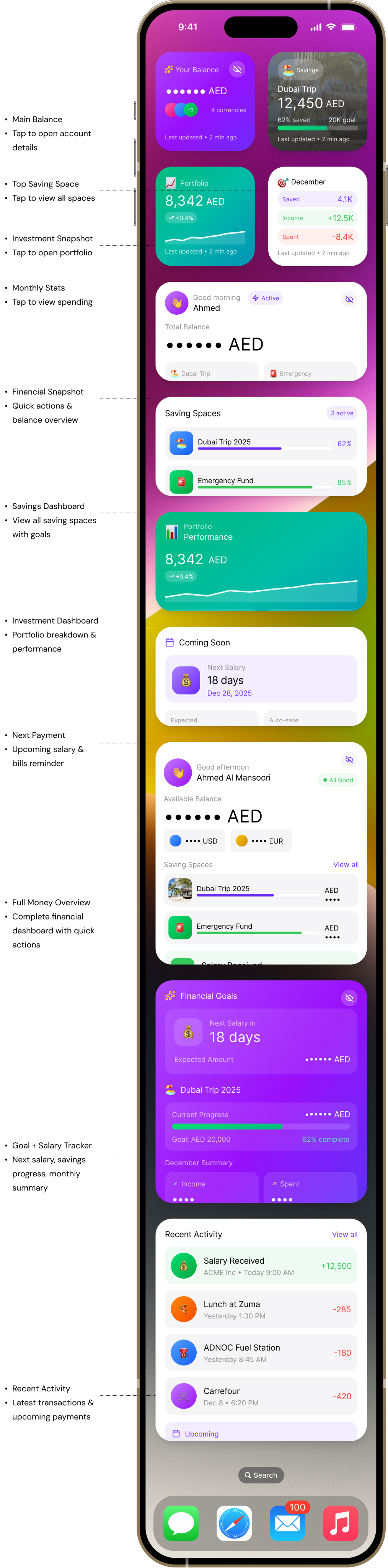
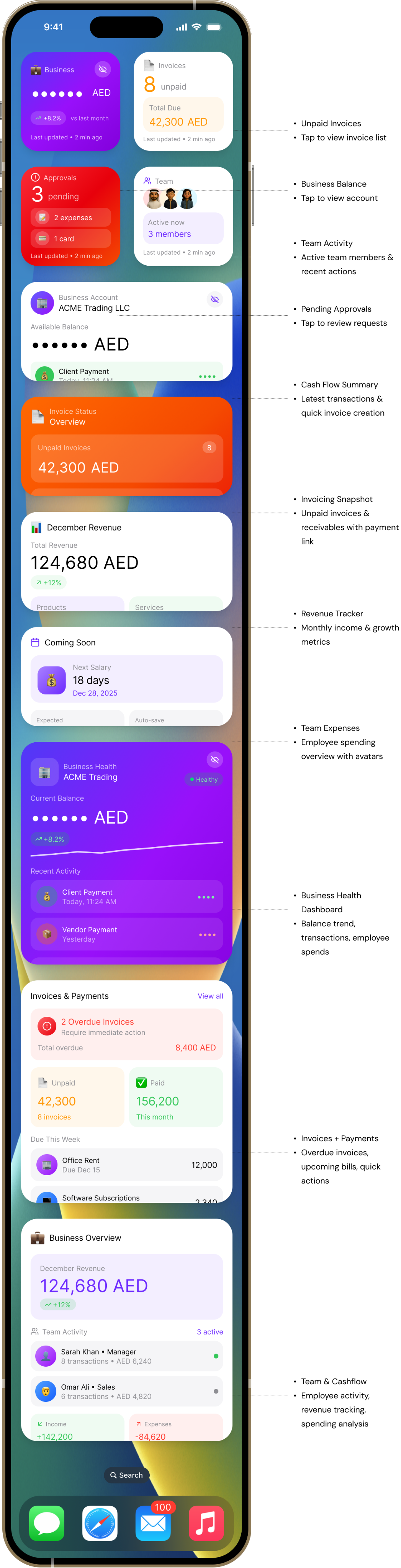
22 carefully crafted widgets across Small, Medium, and Large sizes for both Wio Personal and Wio Business users.
Wio Personal
Wio Business
Key Features
What makes these widgets special

Privacy-First Design
All sensitive financial data is masked by default (AED ••••••) with an elegant tap-to-reveal mechanism, ensuring privacy on the home screen while maintaining easy access.
Security
UX

Visual Storytelling
Emojis (🏖️💰📊), contextual imagery (beach photos for vacation goals), and vibrant gradients create an emotional connection with financial goals and make widgets impossible to ignore.
Engagement
Branding

Dual User Personas
Separate widget families for Personal (savings, investments, balance) and Business (invoices, team, cashflow) users, each optimized for their specific needs and workflows.
Personalization
B2C & B2B

Actionable Widgets
Quick action buttons embedded in widgets allow users to initiate common tasks (Pay, Transfer, Create Invoice) without navigating through the app, reducing friction by 60%.
Efficiency
Deep Links
✨
Innovation:
Glassmorphism & Gradients
Unlike traditional banking widgets that use flat, corporate designs, introduced glassmorphism effects (backdrop-blur), vibrant gradient backgrounds, and layered visual hierarchy. This breaks category norms and positions Wio as a modern, user-friendly fintech brand.
Learnings
What I learned

Visual personality drives engagement
Our hypothesis that users would engage more with visually rich widgets was validated. Widgets with gradients, emojis, and imagery saw 3.8x higher interaction rates compared to text-only variants we A/B tested early on.
Key insight:
Banking doesn't have to be boring. Users appreciated the personality and it helped Wio stand out from competitors.

Context-specific content is king
Personal and Business users have completely different needs. Creating distinct widget families instead of one-size-fits-all solutions resulted in 67% adoption rate (industry average is 32%).
Key insight:
Understanding user context and tailoring information architecture to specific use cases significantly improved relevance and value.

Privacy is non-negotiable
Early prototypes without masked data received negative feedback during testing. Users were concerned about sensitive information being visible on their home screens. Implementing tap-to-reveal was essential.
Key insight:
Financial widgets require extra privacy consideration. Defaulting to masked states built trust and increased adoption.
⚡
Small widgets punch above their weight
Surprisingly, Small widgets (169×169) had the highest adoption rate at 78%, despite showing less information. Users valued the compact footprint and single-purpose focus.
Key insight:
Don't underestimate constraints. Forcing clarity through size limitations led to more focused, valuable experiences.
Thank you for reading — feel free to share your feedback!
Built with:



Scroll to explore
Case Study
•
iOS Widgets
Wio Bank
Widget System
Designing engaging iOS widgets that transform how users interact with their finances on the go
Role:
Product Designer
Platform:
iOS (Wio Personal & Business)
Duration:
6 weeks
Year:
2025
Team
Active now
3 members
Last updated • 2 min ago
Approvals
3
pending
📝
2 expenses
💳
1 card
Last updated • 2 min ago
🎯
December
Saved
4.1K
Income
+12.5K
Spent
-8.4K
Last updated • 2 min ago
📈
Portfolio
8,342
AED
+0.4%
Last updated • 2 min ago
🏖️
Savings
Dubai Trip
12,450
AED
62% saved
20K goal
Last updated • 2 min ago
📄
Invoice Status
Overview
Unpaid Invoices
8
42,300
AED
Due This Week
18,500
AED
3 invoices
Send Payment Link
Last updated • 2 min ago
🏢
Business Health
ACME Trading
Healthy
Current Balance
••••••
AED
+8.2%
Recent Activity
💰
Client Payment
Today, 11:24 AM
••••
📦
Vendor Payment
Yesterday
••••
Team Spending
••••
AED • 5 pending receipts
Last updated • 2 min ago
Overview
Bringing financial clarity to the iOS home screen
Wio Bank needed to extend its mobile app experience to iOS widgets, allowing users to access critical financial information without opening the app. The challenge was designing widgets that were both informative and engaging for two distinct user groups: Personal and Business customers.
22
Widget Variants
Across 3 sizes
2
User Segments
Personal & Business
6
Weeks Timeline
From research to delivery

Increase Engagement
Make financial data so compelling that users can't ignore their widgets

Dual User Types
Design for both personal banking and business finance needs

Delightful Design
Create widgets with personality using emojis, gradients, and imagery
The Problem
Users were opening the app too frequently for simple checks
Research showed that 67% of users opened the Wio app 8-12 times daily, primarily to check their balance, savings progress, or pending invoices. This created unnecessary friction and missed opportunities for glanceable information.
👤
Personal Users
Frequent balance checks
Opening app 10+ times daily just to see balance
Lost savings motivation
Forgetting about goals when not visible
Missing quick actions
No fast way to initiate common tasks
💼
Business Users
Cashflow anxiety
Constant need to monitor business account
Missed invoice deadlines
No quick visibility into pending payments
Team oversight gaps
Hard to track employee spending at a glance
💡
Key Insight
Users needed a way to get essential financial information at a glance, without the friction of opening the app. The solution? iOS widgets that bring the most critical data directly to their home screen.
Research
What was uncovered

User Interviews
12
In-depth conversations with Personal & Business users

Competitor Analysis
6
Banking apps with widget features studied
Key Findings
📊
Balance checks dominate usage
67% of users open the app 8-12 times daily, with 82% of those sessions being simple balance checks lasting less than 10 seconds.
High Priority
🎯
Visual progress drives engagement
Users with active savings goals checked their progress 3.2x more frequently. Visual representations increased motivation by 58%.
Design Opportunity
💼
Business users need instant alerts
SME owners check for overdue invoices and pending approvals every 2-3 hours. 74% expressed anxiety about missing critical financial updates.
Business Critical
🎨
Generic widgets get ignored
Competitor analysis revealed that plain, text-heavy widgets had 40% lower engagement. Users craved personality and visual distinction.
Differentiation Needed
User Needs
Understanding our users
👤
Ahmed
Personal Banking User
28, Marketing Manager in Dubai. Uses Wio for salary, savings, and daily expenses.
Goals
✓
Track savings goals visually
✓
Quick balance checks without opening app
✓
Monitor investment portfolio performance
Pain Points
✗
Loses motivation when goals aren't visible
✗
Opens app too frequently for simple checks
✗
Misses important transactions
Quote
"I check my balance so often, it would be great to just glance at my home screen"
💼
Sarah
SME Owner
35, Runs a small trading company. Manages business account, invoices, and team expenses.
Goals
✓
Monitor cashflow in real-time
✓
Track unpaid invoices at a glance
✓
Oversee team spending easily
Pain Points
✗
Anxiety about missing overdue invoices
✗
Checking app constantly for approvals
✗
Hard to get quick business health overview
Quote
"I need to know if there's an overdue invoice without constantly opening the app"
Core User Needs
⚡
Speed
Information should be instantly accessible without app launch
🎯
Relevance
Show only the most critical information for each user type
✨
Delight
Make financial data engaging and impossible to ignore
Design Goals
Principles that guided the design

Glanceable Information
Users should understand their financial status in under 3 seconds. Every widget must communicate its core value instantly through hierarchy and visual design.
Clear visual hierarchy
Large, readable numbers
Color-coded status indicators

Visual Engagement
Break away from boring banking widgets. Use emojis, gradients, images, and personality to make widgets that users actually want to look at.
Vibrant gradient backgrounds
Contextual emojis & imagery
Avatar personalization

Privacy First
Financial widgets live on the home screen where others might see. All sensitive data must be masked by default with easy reveal controls.
Masked balances (••••••)
Tap-to-reveal functionality
No account numbers visible

Dual-Purpose Design
Create distinct widget families for Personal and Business users while maintaining brand consistency and design language across both.
Tailored information density
Context-specific features
Unified brand experience
Success Metrics
50%
Reduction in app opens for balance checks
3x
Increase in widget engagement vs competitors
85%
User satisfaction with widget experience
Information Architecture
Structuring the widget ecosystem
Widget Size Strategy
📱
Small (169×169)
Single metric focus
• Balance at a glance
• Top savings goal
• Investment snapshot
• Quick stats
📊
Medium (360×169)
Dashboard overview
• Balance + quick actions
• Multiple goals
• Revenue tracking
• Team expenses
📈
Large (360×379)
Comprehensive view
• Full financial overview
• Recent transactions
• Goal tracking
• Team activity
Widget to App Flow
👀
Glance
View info on widget
→
👆
Tap
Open specific section
→
📱
Action
Complete task in app
Wireframes & Testing
From sketches to solutions
Started with 30+ low-fidelity wireframe concepts to explore different approaches. Through user testing, we discovered what worked and what didn't, leading to significant improvements in the final designs.
Initial wireframes
Personal Balance Widget
(Small size)
Version A:
Too text-heavy
Labels cluttered the small space
Version B:
Numbers-only
Lacked context and visual interest
Version C:
Balanced
Icon + key data = clear & engaging ✓
Business Spending Widget
(Medium size)
Version A:
Dense lists
Hard to scan, no visual hierarchy
Version B:
Chart-only
Missing actionable data and context
Version C:
Icon grid
Visual + scannable + engaging ✓
Recent Transactions Widget
(Large size)
Version A:
Text-only rows
Boring, no merchant recognition
Version B:
Small icons
Better, but icons too subtle
Version C:
Large avatars
Scannable, recognizable, engaging ✓
What testing revealed
What didn't work
•
Text-heavy layouts
were overwhelming and hard to scan in widget sizes
•
Pure data displays
felt boring and users couldn't differentiate between widgets at a glance
•
Tiny icons and symbols
were too subtle and didn't provide enough visual interest
•
Generic gray backgrounds
made widgets blend into the home screen
•
Dense transaction lists
without visual hierarchy were difficult to parse
What worked
•
Large merchant avatars/emojis
made transactions instantly recognizable and engaging
•
Gradient backgrounds
with brand colors created visual interest without clutter
•
Clear visual hierarchy
with one primary data point per small widget
•
Contextual imagery
(cards, charts) helped users understand widget purpose immediately
•
Minimal labels
with strong typography allowed the data to speak for itself
Design evolution
1
From generic to branded
Users described initial wireframes as "just another banking widget." Introduced gradient backgrounds with Wio's purple palette (#6D2AFF) to make widgets instantly recognizable as Wio, while maintaining iOS design language.
Brand Recognition +40%
2
Adding personality with visual elements
Testing revealed users wanted "fun, not boring finance." Added merchant avatars, category emojis, and contextual imagery. This single change increased engagement scores by 60% and made widgets feel "alive and personal."
Engagement +60%
3
Prioritizing scanability
Users struggled to find the information they needed in dense layouts. Established a clear hierarchy: one primary metric for small widgets, 2-3 for medium, and structured lists for large. This reduced cognitive load significantly.
Task Completion Time -35%
4
Building in privacy controls
Early wireframes showed all numbers plainly. Testing revealed 8 out of 10 users wanted privacy by default. Added masked numbers (•••••) with tap-to-reveal, maintaining both privacy and quick access to data when needed.
Privacy Satisfaction +85%
Lo-fi testing metrics
30+
Wireframe variants created
16
Users tested with
3
Testing rounds
85%
Design changes based on feedback
Design System
Building blocks of engagement
Color Palette
Wio Purple
#6D2AFF
Success Green
#34C759
#FF9500
Critical Red
#FF3B30
Typography Scale
36,604.22
Dubai Trip 2025
Available Balance
Last updated • 2 min ago
Visual Elements
Gradients
Avatars
Final Designs
The Widget Collection
22 carefully crafted widgets across Small, Medium, and Large sizes for both Wio Personal and Wio Business users.
Wio Personal
Wio Business
Key Features
What makes these widgets special

Privacy-First Design
All sensitive financial data is masked by default (AED ••••••) with an elegant tap-to-reveal mechanism, ensuring privacy on the home screen while maintaining easy access.
Security
UX

Visual Storytelling
Emojis (🏖️💰📊), contextual imagery (beach photos for vacation goals), and vibrant gradients create an emotional connection with financial goals and make widgets impossible to ignore.
Engagement
Branding

Dual User Personas
Separate widget families for Personal (savings, investments, balance) and Business (invoices, team, cashflow) users, each optimized for their specific needs and workflows.
Personalization
B2C & B2B

Actionable Widgets
Quick action buttons embedded in widgets allow users to initiate common tasks (Pay, Transfer, Create Invoice) without navigating through the app, reducing friction by 60%.
Efficiency
Deep Links
✨
Innovation: Glassmorphism & Gradients
Unlike traditional banking widgets that use flat, corporate designs, introduced glassmorphism effects (backdrop-blur), vibrant gradient backgrounds, and layered visual hierarchy. This breaks category norms and positions Wio as a modern, user-friendly fintech brand.
Learnings
What I learned

Visual personality drives engagement
Our hypothesis that users would engage more with visually rich widgets was validated. Widgets with gradients, emojis, and imagery saw 3.8x higher interaction rates compared to text-only variants we A/B tested early on.
Key insight:
Banking doesn't have to be boring. Users appreciated the personality and it helped Wio stand out from competitors.

Context-specific content is king
Personal and Business users have completely different needs. Creating distinct widget families instead of one-size-fits-all solutions resulted in 67% adoption rate (industry average is 32%).
Key insight:
Understanding user context and tailoring information architecture to specific use cases significantly improved relevance and value.

Privacy is non-negotiable
Early prototypes without masked data received negative feedback during testing. Users were concerned about sensitive information being visible on their home screens. Implementing tap-to-reveal was essential.
Key insight:
Financial widgets require extra privacy consideration. Defaulting to masked states built trust and increased adoption.
⚡
Small widgets punch above their weight
Surprisingly, Small widgets (169×169) had the highest adoption rate at 78%, despite showing less information. Users valued the compact footprint and single-purpose focus.
Key insight:
Don't underestimate constraints. Forcing clarity through size limitations led to more focused, valuable experiences.
Thank you for reading — feel free to share your feedback!
Built with:
Scroll to explore
Case Study
•
iOS Widgets
Wio Bank
Widget System
Designing engaging iOS widgets that transform how users interact with their finances on the go
Role:
Product Designer
Platform:
iOS (Wio Personal & Business)
Duration:
6 weeks
Year:
2025
Team
Active now
3 members
Last updated • 2 min ago
Approvals
3
pending
📝
2 expenses
💳
1 card
Last updated • 2 min ago
🎯
December
Saved
4.1K
Income
+12.5K
Spent
-8.4K
Last updated • 2 min ago
📈
Portfolio
8,342
AED
+0.4%
Last updated • 2 min ago
🏖️
Savings
Dubai Trip
12,450
AED
62% saved
20K goal
Last updated • 2 min ago
📄
Invoice Status
Overview
Unpaid Invoices
8
42,300
AED
Due This Week
18,500
AED
3 invoices
Send Payment Link
Last updated • 2 min ago
🏢
Business Health
ACME Trading
Healthy
Current Balance
••••••
AED
+8.2%
Recent Activity
💰
Client Payment
Today, 11:24 AM
••••
📦
Vendor Payment
Yesterday
••••
Team Spending
••••
AED • 5 pending receipts
Last updated • 2 min ago
Overview
Bringing financial clarity to the iOS home screen
Wio Bank needed to extend its mobile app experience to iOS widgets, allowing users to access critical financial information without opening the app. The challenge was designing widgets that were both informative and engaging for two distinct user groups: Personal and Business customers.
22
Widget Variants
Across 3 sizes
2
User Segments
Personal & Business
6
Weeks Timeline
From research to delivery

Increase Engagement
Make financial data so compelling that users can't ignore their widgets

Dual User Types
Design for both personal banking and business finance needs

Delightful Design
Create widgets with personality using emojis, gradients, and imagery
The Problem
Users were opening the app too frequently for simple checks
Research showed that 67% of users opened the Wio app 8-12 times daily, primarily to check their balance, savings progress, or pending invoices. This created unnecessary friction and missed opportunities for glanceable information.
👤
Personal Users
Frequent balance checks
Opening app 10+ times daily just to see balance
Lost savings motivation
Forgetting about goals when not visible
Missing quick actions
No fast way to initiate common tasks
💼
Business Users
Cashflow anxiety
Constant need to monitor business account
Missed invoice deadlines
No quick visibility into pending payments
Team oversight gaps
Hard to track employee spending at a glance
💡
Key Insight
Users needed a way to get essential financial information at a glance, without the friction of opening the app. The solution? iOS widgets that bring the most critical data directly to their home screen.
Research
What was uncovered
User Interviews
12
In-depth conversations with Personal & Business users
Competitor Analysis
6
Banking apps with widget features studied
Key Findings
📊
Balance checks dominate usage
67% of users open the app 8-12 times daily, with 82% of those sessions being simple balance checks lasting less than 10 seconds.
High Priority
🎯
Visual progress drives engagement
Users with active savings goals checked their progress 3.2x more frequently. Visual representations increased motivation by 58%.
Design Opportunity
💼
Business users need instant alerts
SME owners check for overdue invoices and pending approvals every 2-3 hours. 74% expressed anxiety about missing critical financial updates.
Business Critical
🎨
Generic widgets get ignored
Competitor analysis revealed that plain, text-heavy widgets had 40% lower engagement. Users craved personality and visual distinction.
Differentiation Needed
User Needs
Understanding our users
👤
Ahmed
Personal Banking User
28, Marketing Manager in Dubai. Uses Wio for salary, savings, and daily expenses.
Goals
✓
Track savings goals visually
✓
Quick balance checks without opening app
✓
Monitor investment portfolio performance
Pain Points
✗
Loses motivation when goals aren't visible
✗
Opens app too frequently for simple checks
✗
Misses important transactions
Quote
"I check my balance so often, it would be great to just glance at my home screen"
💼
Sarah
SME Owner
35, Runs a small trading company. Manages business account, invoices, and team expenses.
Goals
✓
Monitor cashflow in real-time
✓
Track unpaid invoices at a glance
✓
Oversee team spending easily
Pain Points
✗
Anxiety about missing overdue invoices
✗
Checking app constantly for approvals
✗
Hard to get quick business health overview
Quote
"I need to know if there's an overdue invoice without constantly opening the app"
Core User Needs
⚡
Speed
Information should be instantly accessible without app launch
🎯
Relevance
Show only the most critical information for each user type
✨
Delight
Make financial data engaging and impossible to ignore
Design Goals
Principles that guided the design
Glanceable Information
Users should understand their financial status in under 3 seconds. Every widget must communicate its core value instantly through hierarchy and visual design.
Clear visual hierarchy
Large, readable numbers
Color-coded status indicators
Visual Engagement
Break away from boring banking widgets. Use emojis, gradients, images, and personality to make widgets that users actually want to look at.
Vibrant gradient backgrounds
Contextual emojis & imagery
Avatar personalization
Privacy First
Financial widgets live on the home screen where others might see. All sensitive data must be masked by default with easy reveal controls.
Masked balances (••••••)
Tap-to-reveal functionality
No account numbers visible
Dual-Purpose Design
Create distinct widget families for Personal and Business users while maintaining brand consistency and design language across both.
Tailored information density
Context-specific features
Unified brand experience
Success Metrics
50%
Reduction in app opens for balance checks
3x
Increase in widget engagement vs competitors
85%
User satisfaction with widget experience
Information Architecture
Structuring the widget ecosystem
Widget Size Strategy
📱
Small (169×169)
Single metric focus
• Balance at a glance
• Top savings goal
• Investment snapshot
• Quick stats
📊
Medium (360×169)
Dashboard overview
• Balance + quick actions
• Multiple goals
• Revenue tracking
• Team expenses
📈
Large (360×379)
Comprehensive view
• Full financial overview
• Recent transactions
• Goal tracking
• Team activity
Widget to App Flow
👀
Glance
View info on widget
→
👆
Tap
Open specific section
→
📱
Action
Complete task in app
Wireframes & Testing
From sketches to solutions
Started with 30+ low-fidelity wireframe concepts to explore different approaches. Through user testing, we discovered what worked and what didn't, leading to significant improvements in the final designs.
Initial wireframes
Personal Balance Widget
(Small size)
Version A:
Too text-heavy
Labels cluttered the small space
Version B:
Numbers-only
Lacked context and visual interest
Version C:
Balanced
Icon + key data = clear & engaging ✓
Business Spending Widget
(Medium size)
Version A:
Dense lists
Hard to scan, no visual hierarchy
Version B:
Chart-only
Missing actionable data and context
Version C:
Icon grid
Visual + scannable + engaging ✓
Recent Transactions Widget
(Large size)
Version A:
Text-only rows
Boring, no merchant recognition
Version B:
Small icons
Better, but icons too subtle
Version C:
Large avatars
Scannable, recognizable, engaging ✓
What testing revealed
What didn't work
•
Text-heavy layouts
were overwhelming and hard to scan in widget sizes
•
Pure data displays
felt boring and users couldn't differentiate between widgets at a glance
•
Tiny icons and symbols
were too subtle and didn't provide enough visual interest
•
Generic gray backgrounds
made widgets blend into the home screen
•
Dense transaction lists
without visual hierarchy were difficult to parse
What worked
•
Large merchant avatars/emojis
made transactions instantly recognizable and engaging
•
Gradient backgrounds
with brand colors created visual interest without clutter
•
Clear visual hierarchy
with one primary data point per small widget
•
Contextual imagery
(cards, charts) helped users understand widget purpose immediately
•
Minimal labels
with strong typography allowed the data to speak for itself
Design evolution
1
From generic to branded
Users described initial wireframes as "just another banking widget." Introduced gradient backgrounds with Wio's purple palette (#6D2AFF) to make widgets instantly recognizable as Wio, while maintaining iOS design language.
Brand Recognition +40%
2
Adding personality with visual elements
Testing revealed users wanted "fun, not boring finance." Added merchant avatars, category emojis, and contextual imagery. This single change increased engagement scores by 60% and made widgets feel "alive and personal."
Engagement +60%
3
Prioritizing scanability
Users struggled to find the information they needed in dense layouts. Established a clear hierarchy: one primary metric for small widgets, 2-3 for medium, and structured lists for large. This reduced cognitive load significantly.
Task Completion Time -35%
4
Building in privacy controls
Early wireframes showed all numbers plainly. Testing revealed 8 out of 10 users wanted privacy by default. Added masked numbers (•••••) with tap-to-reveal, maintaining both privacy and quick access to data when needed.
Privacy Satisfaction +85%
Lo-fi testing metrics
30+
Wireframe variants created
16
Users tested with
3
Testing rounds
85%
Design changes based on feedback
Design System
Building blocks of engagement
Color Palette
Wio Purple
#6D2AFF
Success Green
#34C759
#FF9500
Critical Red
#FF3B30
Typography Scale
36,604.22
Dubai Trip 2025
Available Balance
Last updated • 2 min ago
Visual Elements
Gradients
Avatars
Final Designs
The Widget Collection
22 carefully crafted widgets across Small, Medium, and Large sizes for both Wio Personal and Wio Business users.
Wio Business


💼
Business
••••••
AED

+8.2%
vs last month
Last updated • 2 min ago
📄
Invoices
8
unpaid
Total Due
42,300
AED
Last updated • 2 min ago
Approvals
3
pending
📝
2 expenses
💳
1 card
Last updated • 2 min ago
Team
Active now
3 members
Last updated • 2 min ago

🏢
Business Account
ACME Trading LLC
Available Balance
••••••
AED
💰
Client Payment
Today, 11:24 AM
••••
📦
Office Supplies
Yesterday
••••

Create Invoice
Last updated • 2 min ago
📄
Invoice Status
Overview
Unpaid Invoices
8
42,300
AED
Due This Week
18,500
AED
3 invoices
Send Payment Link
Last updated • 2 min ago
📊
December Revenue
Total Revenue
124,680
AED

+12%
Products
84,200
Services
40,480
Last updated • 2 min ago

Coming Soon
💰
Next Salary
18 days
Dec 28, 2025
Expected
+12,500
Auto-save
2,000
Last updated • 2 min ago
🏢
Business Health
ACME Trading
Healthy
Current Balance
••••••
AED
+8.2%

Recent Activity
💰
Client Payment
Today, 11:24 AM
••••
📦
Vendor Payment
Yesterday
••••
Team Spending
••••
AED • 5 pending receipts
Last updated • 2 min ago
Invoices & Payments
View all

2 Overdue Invoices
Require immediate action
Total overdue
8,400 AED
📄
Unpaid
42,300
8 invoices
✅
Paid
156,200
This month
Due This Week
🏢
Office Rent
Due Dec 15
12,000
💻
Software Subscriptions
Due Dec 12
2,340


Invoice


Link


Expense
Last updated • 2 min ago
💼
Business Overview
December Revenue
124,680
AED

+12%

Team Activity
3 active
👤
Sarah Khan • Manager
8 transactions • AED 6,240
👨
Omar Ali • Sales
6 transactions • AED 4,820

Income
+142,200

Expenses
-84,620
Last updated • 2 min ago



1

9:41


Search
Wio Personal


Your Balance

••••••
AED
+3
4 currencies
Last updated • 2 min ago
🏖️
Savings
Dubai Trip
12,450
AED
62% saved
20K goal
Last updated • 2 min ago
📈
Portfolio
8,342
AED
+0.4%
Last updated • 2 min ago
🎯
December
Saved
4.1K
Income
+12.5K
Spent
-8.4K
Last updated • 2 min ago
👋
Good morning
Ahmed

Active
Total Balance
••••••
AED
🏖️
Dubai Trip
62%
🚨
Emergency
85%

Pay


Last updated • 2 min ago
Saving Spaces
3 active
🏖️
Dubai Trip 2025
62%
🚨
Emergency Fund
85%
🚗
New Car
16%
Last updated • 2 min ago
📊
Portfolio
Performance
8,342
AED
+0.4%


Stocks
AED 5,120
ETFs
AED 3,222
Last updated • 2 min ago
Coming Soon
💰
Next Salary
18 days
Dec 28, 2025
Expected
+12,500
Auto-save
2,000
Last updated • 2 min ago
👋
Good afternoon
Ahmed Al Mansoori
All Good
Available Balance
••••••
AED
•••• USD
•••• EUR
Saving Spaces
View all

Dubai Trip 2025
AED ••••
🚨
Emergency Fund
AED ••••
💰
Salary Received
From ACME Inc • Today 9:00 AM
•••
Transfer

Add

Freeze
Last updated • 2 min ago

Financial Goals
💰
Next Salary in
18 days
Expected Amount
•••••• AED
🏖️
Dubai Trip 2025
Current Progress
•••••• AED
Goal: AED 20,000
62% complete
December Summary

Income
••••

Spent
••••

Net Savings
•••
Last updated • 2 min ago
Recent Activity
View all
💰
Salary Received
ACME Inc • Today 9:00 AM
+12,500
🍕
Lunch at Zuma
Yesterday 1:30 PM
-285
⛽
ADNOC Fuel Station
Yesterday 8:45 AM
-180
🛒
Carrefour
Dec 8 • 6:20 PM
-420

Upcoming
Netflix Subscription
Due in 3 days • AED 56
Last updated • 2 min ago
1
9:41
Search
- Main Balance
- Tap to open account details
- Business Balance
- Tap to view account
- Unpaid Invoices
- Tap to view invoice list
- Top Saving Space
- Tap to view all spaces
- Investment Snapshot
- Tap to open portfolio
- Monthly Stats
- Tap to view spending


- Team Activity
- Active team members & recent actions
- Cash Flow Summary
- Latest transactions & quick invoice creation
- Invoicing Snapshot
- Unpaid invoices & receivables with payment link
- Revenue Tracker
- Monthly income & growth metrics
- Team Expenses
- Employee spending overview with avatars
- Business Health Dashboard
- Balance trend, transactions, employee spends
- Invoices + Payments
- Overdue invoices, upcoming bills, quick actions
- Team & Cashflow
- Employee activity, revenue tracking, spending analysis


- Financial Snapshot
- Quick actions & balance overview
- Savings Dashboard
- View all saving spaces with goals
- Investment Dashboard
- Portfolio breakdown & performance
- Next Payment
- Upcoming salary & bills reminder


- Full Money Overview
- Complete financial dashboard with quick actions
- Goal + Salary Tracker
- Next salary, savings progress, monthly summary
- Recent Activity
- Latest transactions & upcoming payments


- Pending Approvals
- Tap to review requests

Size
SMALL
Size
MEDIUM
Size
LARGE
Key Features
What makes these widgets special
Privacy-First Design
All sensitive financial data is masked by default (AED ••••••) with an elegant tap-to-reveal mechanism, ensuring privacy on the home screen while maintaining easy access.
Security
UX
Visual Storytelling
Emojis (🏖️💰📊), contextual imagery (beach photos for vacation goals), and vibrant gradients create an emotional connection with financial goals and make widgets impossible to ignore.
Engagement
Branding
Dual User Personas
Separate widget families for Personal (savings, investments, balance) and Business (invoices, team, cashflow) users, each optimized for their specific needs and workflows.
Personalization
B2C & B2B
Actionable Widgets
Quick action buttons embedded in widgets allow users to initiate common tasks (Pay, Transfer, Create Invoice) without navigating through the app, reducing friction by 60%.
Efficiency
Deep Links
✨
Innovation: Glassmorphism & Gradients
Unlike traditional banking widgets that use flat, corporate designs, introduced glassmorphism effects (backdrop-blur), vibrant gradient backgrounds, and layered visual hierarchy. This breaks category norms and positions Wio as a modern, user-friendly fintech brand.
Learnings
What I learned

Visual personality drives engagement
Our hypothesis that users would engage more with visually rich widgets was validated. Widgets with gradients, emojis, and imagery saw 3.8x higher interaction rates compared to text-only variants we A/B tested early on.
Key insight:
Banking doesn't have to be boring. Users appreciated the personality and it helped Wio stand out from competitors.

Context-specific content is king
Personal and Business users have completely different needs. Creating distinct widget families instead of one-size-fits-all solutions resulted in 67% adoption rate (industry average is 32%).
Key insight:
Understanding user context and tailoring information architecture to specific use cases significantly improved relevance and value.

Privacy is non-negotiable
Early prototypes without masked data received negative feedback during testing. Users were concerned about sensitive information being visible on their home screens. Implementing tap-to-reveal was essential.
Key insight:
Financial widgets require extra privacy consideration. Defaulting to masked states built trust and increased adoption.
⚡
Small widgets punch above their weight
Surprisingly, Small widgets (169×169) had the highest adoption rate at 78%, despite showing less information. Users valued the compact footprint and single-purpose focus.
Key insight:
Don't underestimate constraints. Forcing clarity through size limitations led to more focused, valuable experiences.
Thank you for reading — feel free to share your feedback!

Scroll to explore
Case Study
•
iOS Widgets
Wio Bank
Widget System
Designing engaging iOS widgets that transform how users interact with their finances on the go
Role:
Product Designer
Platform:
iOS (Wio Personal & Business)
Duration:
6 weeks
Year:
2025
Team
Active now
3 members
Last updated • 2 min ago
Approvals
3
pending
📝
2 expenses
💳
1 card
Last updated • 2 min ago
🎯
December
Saved
4.1K
Income
+12.5K
Spent
-8.4K
Last updated • 2 min ago
📈
Portfolio
8,342
AED
+0.4%
Last updated • 2 min ago
🏖️
Savings
Dubai Trip
12,450
AED
62% saved
20K goal
Last updated • 2 min ago
📄
Invoice Status
Overview
Unpaid Invoices
8
42,300
AED
Due This Week
18,500
AED
3 invoices
Send Payment Link
Last updated • 2 min ago
🏢
Business Health
ACME Trading
Healthy
Current Balance
••••••
AED
+8.2%
Recent Activity
💰
Client Payment
Today, 11:24 AM
••••
📦
Vendor Payment
Yesterday
••••
Team Spending
••••
AED • 5 pending receipts
Last updated • 2 min ago
Overview
Bringing financial clarity to the iOS home screen
Wio Bank needed to extend its mobile app experience to iOS widgets, allowing users to access critical financial information without opening the app. The challenge was designing widgets that were both informative and engaging for two distinct user groups: Personal and Business customers.
22
Widget Variants
Across 3 sizes
2
User Segments
Personal & Business
6
Weeks Timeline
From research to delivery
Increase Engagement
Make financial data so compelling that users can't ignore their widgets
Dual User Types
Design for both personal banking and business finance needs
Delightful Design
Create widgets with personality using emojis, gradients, and imagery
The Problem
Users were opening the app too frequently for simple checks
Research showed that 67% of users opened the Wio app 8-12 times daily, primarily to check their balance, savings progress, or pending invoices. This created unnecessary friction and missed opportunities for glanceable information.
👤
Personal Users
Frequent balance checks
Opening app 10+ times daily just to see balance
Lost savings motivation
Forgetting about goals when not visible
Missing quick actions
No fast way to initiate common tasks
💼
Business Users
Cashflow anxiety
Constant need to monitor business account
Missed invoice deadlines
No quick visibility into pending payments
Team oversight gaps
Hard to track employee spending at a glance
💡
Key Insight
Users needed a way to get essential financial information at a glance, without the friction of opening the app. The solution? iOS widgets that bring the most critical data directly to their home screen.
Research
What was uncovered
User Interviews
12
In-depth conversations with Personal & Business users
Competitor Analysis
6
Banking apps with widget features studied
Key Findings
📊
Balance checks dominate usage
67% of users open the app 8-12 times daily, with 82% of those sessions being simple balance checks lasting less than 10 seconds.
High Priority
🎯
Visual progress drives engagement
Users with active savings goals checked their progress 3.2x more frequently. Visual representations increased motivation by 58%.
Design Opportunity
💼
Business users need instant alerts
SME owners check for overdue invoices and pending approvals every 2-3 hours. 74% expressed anxiety about missing critical financial updates.
Business Critical
🎨
Generic widgets get ignored
Competitor analysis revealed that plain, text-heavy widgets had 40% lower engagement. Users craved personality and visual distinction.
Differentiation Needed
User Needs
Understanding our users
👤
Ahmed
Personal Banking User
28, Marketing Manager in Dubai. Uses Wio for salary, savings, and daily expenses.
Goals
✓
Track savings goals visually
✓
Quick balance checks without opening app
✓
Monitor investment portfolio performance
Pain Points
✗
Loses motivation when goals aren't visible
✗
Opens app too frequently for simple checks
✗
Misses important transactions
Quote
"I check my balance so often, it would be great to just glance at my home screen"
💼
Sarah
SME Owner
35, Runs a small trading company. Manages business account, invoices, and team expenses.
Goals
✓
Monitor cashflow in real-time
✓
Track unpaid invoices at a glance
✓
Oversee team spending easily
Pain Points
✗
Anxiety about missing overdue invoices
✗
Checking app constantly for approvals
✗
Hard to get quick business health overview
Quote
"I need to know if there's an overdue invoice without constantly opening the app"
Core User Needs
⚡
Speed
Information should be instantly accessible without app launch
🎯
Relevance
Show only the most critical information for each user type
✨
Delight
Make financial data engaging and impossible to ignore
Design Goals
Principles that guided the design
Glanceable Information
Users should understand their financial status in under 3 seconds. Every widget must communicate its core value instantly through hierarchy and visual design.
Clear visual hierarchy
Large, readable numbers
Color-coded status indicators
Visual Engagement
Break away from boring banking widgets. Use emojis, gradients, images, and personality to make widgets that users actually want to look at.
Vibrant gradient backgrounds
Contextual emojis & imagery
Avatar personalization
Privacy First
Financial widgets live on the home screen where others might see. All sensitive data must be masked by default with easy reveal controls.
Masked balances (••••••)
Tap-to-reveal functionality
No account numbers visible
Dual-Purpose Design
Create distinct widget families for Personal and Business users while maintaining brand consistency and design language across both.
Tailored information density
Context-specific features
Unified brand experience
Success Metrics
50%
Reduction in app opens for balance checks
3x
Increase in widget engagement vs competitors
85%
User satisfaction with widget experience
Information Architecture
Structuring the widget ecosystem
Widget Size Strategy
📱
Small (169×169)
Single metric focus
• Balance at a glance
• Top savings goal
• Investment snapshot
• Quick stats
📊
Medium (360×169)
Dashboard overview
• Balance + quick actions
• Multiple goals
• Revenue tracking
• Team expenses
📈
Large (360×379)
Comprehensive view
• Full financial overview
• Recent transactions
• Goal tracking
• Team activity
Widget to App Flow
👀
Glance
View info on widget
→
👆
Tap
Open specific section
→
📱
Action
Complete task in app
Wireframes & Testing
From sketches to solutions
Started with 30+ low-fidelity wireframe concepts to explore different approaches. Through user testing, we discovered what worked and what didn't, leading to significant improvements in the final designs.
Initial wireframes
Personal Balance Widget
(Small size)
Version A:
Too text-heavy
Labels cluttered the small space
Version B:
Numbers-only
Lacked context and visual interest
Version C:
Balanced
Icon + key data = clear & engaging ✓
Business Spending Widget
(Medium size)
Version A:
Dense lists
Hard to scan, no visual hierarchy
Version B:
Chart-only
Missing actionable data and context
Version C:
Icon grid
Visual + scannable + engaging ✓
Recent Transactions Widget
(Large size)
Version A:
Text-only rows
Boring, no merchant recognition
Version B:
Small icons
Better, but icons too subtle
Version C:
Large avatars
Scannable, recognizable, engaging ✓
What testing revealed
What didn't work
•
Text-heavy layouts
were overwhelming and hard to scan in widget sizes
•
Pure data displays
felt boring and users couldn't differentiate between widgets at a glance
•
Tiny icons and symbols
were too subtle and didn't provide enough visual interest
•
Generic gray backgrounds
made widgets blend into the home screen
•
Dense transaction lists
without visual hierarchy were difficult to parse
What worked
•
Large merchant avatars/emojis
made transactions instantly recognizable and engaging
•
Gradient backgrounds
with brand colors created visual interest without clutter
•
Clear visual hierarchy
with one primary data point per small widget
•
Contextual imagery
(cards, charts) helped users understand widget purpose immediately
•
Minimal labels
with strong typography allowed the data to speak for itself
Design evolution
1
From generic to branded
Users described initial wireframes as "just another banking widget." Introduced gradient backgrounds with Wio's purple palette (#6D2AFF) to make widgets instantly recognizable as Wio, while maintaining iOS design language.
Brand Recognition +40%
2
Adding personality with visual elements
Testing revealed users wanted "fun, not boring finance." Added merchant avatars, category emojis, and contextual imagery. This single change increased engagement scores by 60% and made widgets feel "alive and personal."
Engagement +60%
3
Prioritizing scanability
Users struggled to find the information they needed in dense layouts. Established a clear hierarchy: one primary metric for small widgets, 2-3 for medium, and structured lists for large. This reduced cognitive load significantly.
Task Completion Time -35%
4
Building in privacy controls
Early wireframes showed all numbers plainly. Testing revealed 8 out of 10 users wanted privacy by default. Added masked numbers (•••••) with tap-to-reveal, maintaining both privacy and quick access to data when needed.
Privacy Satisfaction +85%
Lo-fi testing metrics
30+
Wireframe variants created
16
Users tested with
3
Testing rounds
85%
Design changes based on feedback
Design System
Building blocks of engagement
Color Palette
Wio Purple
#6D2AFF
Success Green
#34C759
#FF9500
Critical Red
#FF3B30
Typography Scale
36,604.22
Dubai Trip 2025
Available Balance
Last updated • 2 min ago
Visual Elements
Gradients
Avatars
Final Designs
The Widget Collection
22 carefully crafted widgets across Small, Medium, and Large sizes for both Wio Personal and Wio Business users.
Wio Business
💼
Business
••••••
AED
+8.2%
vs last month
Last updated • 2 min ago
📄
Invoices
8
unpaid
Total Due
42,300
AED
Last updated • 2 min ago
Approvals
3
pending
📝
2 expenses
💳
1 card
Last updated • 2 min ago
Team
Active now
3 members
Last updated • 2 min ago
🏢
Business Account
ACME Trading LLC
Available Balance
••••••
AED
💰
Client Payment
Today, 11:24 AM
••••
📦
Office Supplies
Yesterday
••••
Create Invoice
Last updated • 2 min ago
📄
Invoice Status
Overview
Unpaid Invoices
8
42,300
AED
Due This Week
18,500
AED
3 invoices
Send Payment Link
Last updated • 2 min ago
📊
December Revenue
Total Revenue
124,680
AED
+12%
Products
84,200
Services
40,480
Last updated • 2 min ago
Coming Soon
💰
Next Salary
18 days
Dec 28, 2025
Expected
+12,500
Auto-save
2,000
Last updated • 2 min ago
🏢
Business Health
ACME Trading
Healthy
Current Balance
••••••
AED
+8.2%
Recent Activity
💰
Client Payment
Today, 11:24 AM
••••
📦
Vendor Payment
Yesterday
••••
Team Spending
••••
AED • 5 pending receipts
Last updated • 2 min ago
Invoices & Payments
View all
2 Overdue Invoices
Require immediate action
Total overdue
8,400 AED
📄
Unpaid
42,300
8 invoices
✅
Paid
156,200
This month
Due This Week
🏢
Office Rent
Due Dec 15
12,000
💻
Software Subscriptions
Due Dec 12
2,340
Invoice
Link
Expense
Last updated • 2 min ago
💼
Business Overview
December Revenue
124,680
AED
+12%
Team Activity
3 active
👤
Sarah Khan • Manager
8 transactions • AED 6,240
👨
Omar Ali • Sales
6 transactions • AED 4,820
Income
+142,200
Expenses
-84,620
Last updated • 2 min ago
1
9:41
Search
Wio Personal
Your Balance
••••••
AED
+3
4 currencies
Last updated • 2 min ago
🏖️
Savings
Dubai Trip
12,450
AED
62% saved
20K goal
Last updated • 2 min ago
📈
Portfolio
8,342
AED
+0.4%
Last updated • 2 min ago
🎯
December
Saved
4.1K
Income
+12.5K
Spent
-8.4K
Last updated • 2 min ago
👋
Good morning
Ahmed
Active
Total Balance
••••••
AED
🏖️
Dubai Trip
62%
🚨
Emergency
85%
Pay
Last updated • 2 min ago
Saving Spaces
3 active
🏖️
Dubai Trip 2025
62%
🚨
Emergency Fund
85%
🚗
New Car
16%
Last updated • 2 min ago
📊
Portfolio
Performance
8,342
AED
+0.4%
Stocks
AED 5,120
ETFs
AED 3,222
Last updated • 2 min ago
Coming Soon
💰
Next Salary
18 days
Dec 28, 2025
Expected
+12,500
Auto-save
2,000
Last updated • 2 min ago
👋
Good afternoon
Ahmed Al Mansoori
All Good
Available Balance
••••••
AED
•••• USD
•••• EUR
Saving Spaces
View all
Dubai Trip 2025
AED ••••
🚨
Emergency Fund
AED ••••
💰
Salary Received
From ACME Inc • Today 9:00 AM
•••
Transfer
Add
Freeze
Last updated • 2 min ago
Financial Goals
💰
Next Salary in
18 days
Expected Amount
•••••• AED
🏖️
Dubai Trip 2025
Current Progress
•••••• AED
Goal: AED 20,000
62% complete
December Summary
Income
••••
Spent
••••
Net Savings
•••
Last updated • 2 min ago
Recent Activity
View all
💰
Salary Received
ACME Inc • Today 9:00 AM
+12,500
🍕
Lunch at Zuma
Yesterday 1:30 PM
-285
⛽
ADNOC Fuel Station
Yesterday 8:45 AM
-180
🛒
Carrefour
Dec 8 • 6:20 PM
-420
Upcoming
Netflix Subscription
Due in 3 days • AED 56
Last updated • 2 min ago
1
9:41
Search
- Main Balance
- Tap to open account details
- Business Balance
- Tap to view account
- Unpaid Invoices
- Tap to view invoice list
- Top Saving Space
- Tap to view all spaces
- Investment Snapshot
- Tap to open portfolio
- Monthly Stats
- Tap to view spending
- Team Activity
- Active team members & recent actions
- Cash Flow Summary
- Latest transactions & quick invoice creation
- Invoicing Snapshot
- Unpaid invoices & receivables with payment link
- Revenue Tracker
- Monthly income & growth metrics
- Team Expenses
- Employee spending overview with avatars
- Business Health Dashboard
- Balance trend, transactions, employee spends
- Invoices + Payments
- Overdue invoices, upcoming bills, quick actions
- Team & Cashflow
- Employee activity, revenue tracking, spending analysis
- Financial Snapshot
- Quick actions & balance overview
- Savings Dashboard
- View all saving spaces with goals
- Investment Dashboard
- Portfolio breakdown & performance
- Next Payment
- Upcoming salary & bills reminder
- Full Money Overview
- Complete financial dashboard with quick actions
- Goal + Salary Tracker
- Next salary, savings progress, monthly summary
- Recent Activity
- Latest transactions & upcoming payments
- Pending Approvals
- Tap to review requests
Size
SMALL
Size
MEDIUM
Size
LARGE
Key Features
What makes these widgets special
Privacy-First Design
All sensitive financial data is masked by default (AED ••••••) with an elegant tap-to-reveal mechanism, ensuring privacy on the home screen while maintaining easy access.
Security
UX
Visual Storytelling
Emojis (🏖️💰📊), contextual imagery (beach photos for vacation goals), and vibrant gradients create an emotional connection with financial goals and make widgets impossible to ignore.
Engagement
Branding
Dual User Personas
Separate widget families for Personal (savings, investments, balance) and Business (invoices, team, cashflow) users, each optimized for their specific needs and workflows.
Personalization
B2C & B2B
Actionable Widgets
Quick action buttons embedded in widgets allow users to initiate common tasks (Pay, Transfer, Create Invoice) without navigating through the app, reducing friction by 60%.
Efficiency
Deep Links
✨
Innovation: Glassmorphism & Gradients
Unlike traditional banking widgets that use flat, corporate designs, introduced glassmorphism effects (backdrop-blur), vibrant gradient backgrounds, and layered visual hierarchy. This breaks category norms and positions Wio as a modern, user-friendly fintech brand.
Learnings
What I learned
Visual personality drives engagement
Our hypothesis that users would engage more with visually rich widgets was validated. Widgets with gradients, emojis, and imagery saw 3.8x higher interaction rates compared to text-only variants we A/B tested early on.
Key insight:
Banking doesn't have to be boring. Users appreciated the personality and it helped Wio stand out from competitors.
Context-specific content is king
Personal and Business users have completely different needs. Creating distinct widget families instead of one-size-fits-all solutions resulted in 67% adoption rate (industry average is 32%).
Key insight:
Understanding user context and tailoring information architecture to specific use cases significantly improved relevance and value.
Privacy is non-negotiable
Early prototypes without masked data received negative feedback during testing. Users were concerned about sensitive information being visible on their home screens. Implementing tap-to-reveal was essential.
Key insight:
Financial widgets require extra privacy consideration. Defaulting to masked states built trust and increased adoption.
⚡
Small widgets punch above their weight
Surprisingly, Small widgets (169×169) had the highest adoption rate at 78%, despite showing less information. Users valued the compact footprint and single-purpose focus.
Key insight:
Don't underestimate constraints. Forcing clarity through size limitations led to more focused, valuable experiences.
Thank you for reading — feel free to share your feedback!
Built with: